If you've ever coordinated anything over WhatsApp, you know the routine. You post the meeting details. Twenty minutes later someone asks what time it was. Then someone asks which entrance. Then someone asks for the lawyer's number again, because it's buried under 140 messages about who's bringing the megaphone.
WhatsApp has just shipped something that helps with exactly this, even if it was clearly built for people arranging dinner. WABetaInfo reported on 2 November that WhatsApp is rolling out text actions on Android and iOS, and it led its weekly roundup on 8 November with it. When the app spots a date, an address, a phone number or an email address in a message, it underlines it, and a tap turns it into something you can use: a calendar entry, a map, a saved contact, a new email.
How it works
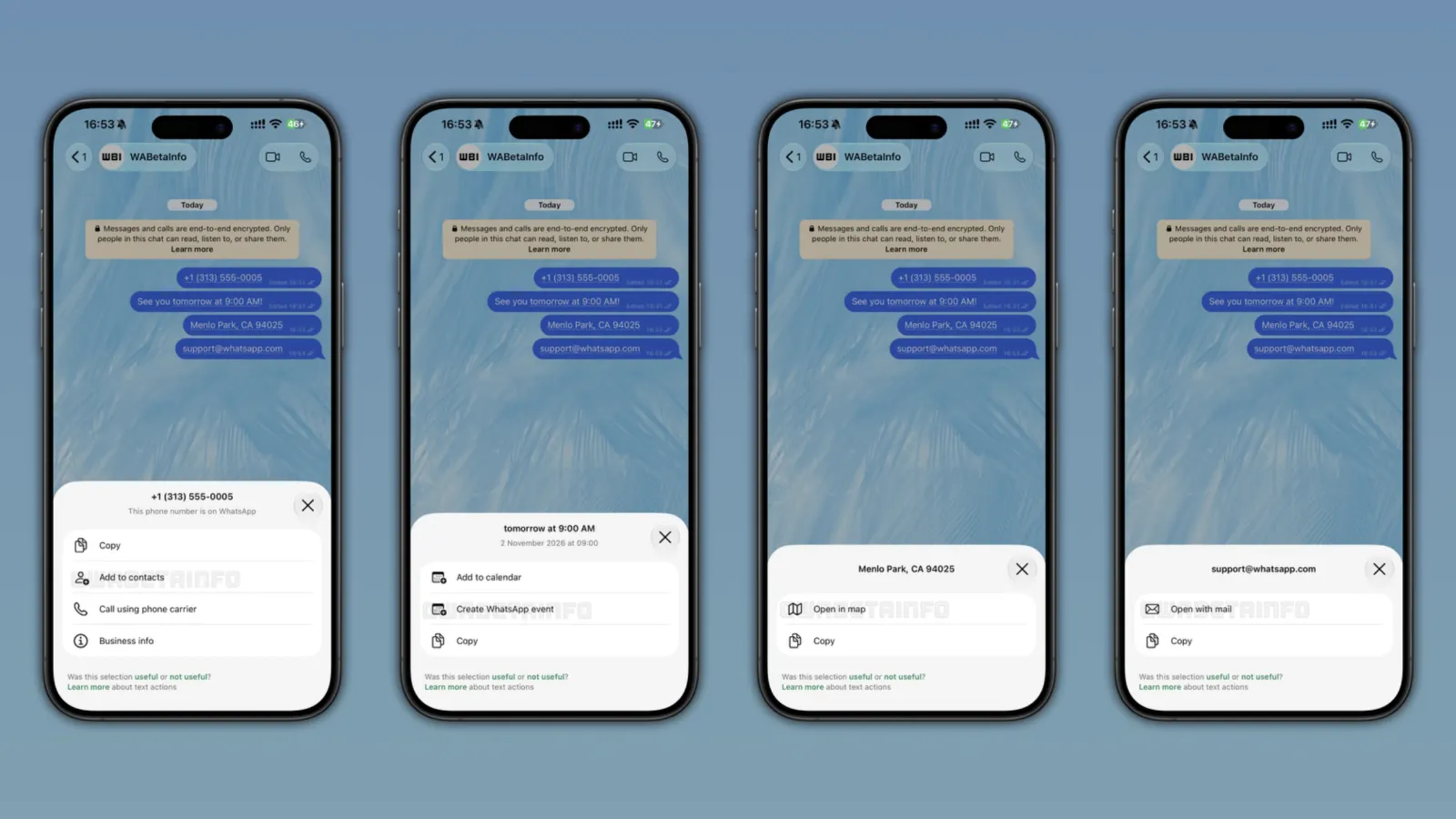
WhatsApp looks for four kinds of text. When it finds one, it draws a dotted line under it. Tap the line and a small panel slides up, with the text it detected at the top (so you can check it read the right thing) and a few shortcuts under it. If you don't care, you ignore the line and keep chatting.
What you get depends on what it found. A phone number can be copied, added to your contacts or called through your phone carrier, and a business number also shows its business info. A date or time can go into your calendar, be copied, or become a WhatsApp event. An address can be copied or opened in your maps app. An email address opens in your mail app or gets copied.
It works on your own messages too, not only the ones you receive. WABetaInfo points out that a few of these actions already existed in some form. What's new is that they're all in one place, with the same underline.
There's also a little feedback line at the bottom of each panel asking whether the selection was useful. Say no and you can tell it whether it grabbed the wrong text or you just didn't need the action. WABetaInfo says that only sends WhatsApp a flag, not your message.
The privacy part is the bit I was most curious about, and it's reassuring. According to WABetaInfo, the detection runs on your phone with plain pattern matching (regular expressions, if you're the kind of person who enjoys that detail). WhatsApp's servers never see the message or the suggestion, and end-to-end encryption isn't touched.
It's a gradual rollout. Some people on the latest versions of WhatsApp for Android and iOS have it already, more accounts should get it over the next few weeks, and WhatsApp hasn't said when everyone will.
Why organizers should care
A lot of what a campaign, a union branch or a neighbourhood collective sends on WhatsApp is exactly these four things: dates, places, phone numbers and the odd email address. So a feature built for people arranging dinner lands right in the middle of how people organize. The examples below are made up, but I bet you've sent something close to each of them.
1. A demo: meeting point, time and the legal-support line in one message
Demos are where the "where are you??" messages pile up, and where a number you can't find quickly becomes a problem. So put everything in one message, written out in full:
Saturday 15 November at 11:00, we meet at Plaça de Catalunya, 08002 Barcelona, by the fountains. Legal support during the march: +34 600 000 000. Save it before you leave home.
With text actions, someone reading that on the bus taps the date and it's in their calendar. They tap the address and their maps app opens on the square. They tap the number and save it as "Legal support" before they need it, while it's still easy to find, rather than in the middle of the march, scrolling back through 300 messages to look for it.
Pin that message in the group. Anyone who joins late gets the same three taps.
2. A letter-writing push: one email address, one tap
Campaigns ask people to write to someone all the time, whether it's a councillor, a newsroom or a landlord's management company. Every extra step between "I should do this" and an open email loses people. Text actions cut one of them:
We're asking the council to stop next week's eviction in our building before the vote on Thursday 20 November. Write to the housing councillor today: [email protected]. Two lines in your own words is plenty.
The email address opens straight in the mail app, and the vote date can go in the calendar so people remember to check what happened. If you also post a sample letter, keep it in a separate message, so the email address sits on its own and is easy to tap.
3. A canvassing weekend: personal invites with each volunteer's own details
If you invite volunteers one by one rather than through a group, each message can carry their own shift, meeting point and the coordinator for their area. The bulk link generator does this: add columns like {{Date}}, {{MeetingPoint}} and {{Coordinator}}, write the message once, and it makes a ready-to-send link for each person.
Hi {{Name}}! Your canvassing shift is {{Date}}. Meet at {{MeetingPoint}}. If you're running late, call {{Coordinator}}.
For a volunteer called Ana, the message that arrives says "Sunday 16 November at 10:00", "Calle de Embajadores 35, 28012 Madrid" and her coordinator's number with the country code, and each of them should get an underline. Ana saves the shift, opens the route and stores the coordinator's number in three taps. You haven't had to explain any of it.
Two things make this work. Fill the columns with full dates and full addresses, not "Sunday" or "the usual place", and use a shared coordinator number for each area rather than someone's personal phone (more on that below).
Write your messages so WhatsApp can read them
All three examples rely on the same thing. WhatsApp finds these details by matching formats, so how you type them decides whether people get the shortcut at all. I went through WABetaInfo's examples and the habits that help are pretty simple.
- Write the date and time out. "Thursday 20 November at 19:00" gives the app everything. "Thursday evening, same place as last time" gives it nothing to work with.
- Watch out for "tomorrow". In the screenshot, "tomorrow at 9:00 AM" gets turned into a full date, 2 November 2026 at 09:00, which is neat in a live chat. What I couldn't find is which day it counts from when someone reads the message three days later, or when it gets forwarded to another group. For anything that'll be passed around, just put the date in.
- Give the whole address: street, number, postcode, city. "Outside the library" works for locals and means nothing to a map.
- Write phone numbers with the country code, like
+34 600 000 000. It works for everyone wherever their phone is registered, and it's the same format a wa.me link needs anyway. - Before sending to 900 people, send it to yourself. Check the date, address and number are all underlined, and if one isn't, rewrite it until it is.
The catch: saving your number just got easier
I like the privacy design here. Nothing leaves the phone, so your group's messages don't end up anywhere new, and for activists who already worry about what's being collected on them, that matters.
The flip side is the "Add to contacts" button. Anyone could always copy a number out of a group message. Now it takes one tap, and in a big group that includes people you'd rather didn't have it. So before you drop a volunteer's personal number into a group of a few hundred, ask yourself whether a shared campaign number, or a wa.me link to one, would do the job just as well. It's the same question that came up when WhatsApp started testing Organizations, a member list for admins of large communities: handy features that make information easier to grab, for everyone.
What we still don't know
WABetaInfo doesn't mention channels, community announcement groups, WhatsApp Web or the desktop apps. There's no word on a setting to turn the underlines off. And since the rollout is gradual, lots of people in your groups won't see any underlines for a while. So keep the old habits too: date in the first line, a maps link for places that are hard to find, event details pinned to the top of the chat.
What I'd do this week
- Rewrite your standard event message once, with the full date, time and address, and save it as a template.
- Send it to yourself on a phone that has the feature and see what gets underlined.
- Use a campaign number for public contact and keep volunteers' personal numbers out of big groups.
- If you're setting up groups for a campaign, our six WhatsApp strategies for political campaigns go through how to structure them.
And for flyers and posters, there's still no dotted underline on paper. A QR code that opens a chat with your campaign number is the closest thing.