If you've ever run a WhatsApp Community with more than a handful of groups, you know the admin side is a bit of a guessing game. There's a neighbourhood group here, a volunteers group there, a press team, and a "logistics for Saturday" group someone created three months ago and nobody closed. Ask a simple question like "who's actually in this thing, and where?" and the only way to answer it is to open every group, scroll, and hope.
A new feature seems to be aimed at that gap. WABetaInfo reported today that WhatsApp is working on something called Organizations, a management layer that sits on top of a community and is meant for the admins of large ones.
It's in very early development, nobody can test it yet, and there's no release date.
What WABetaInfo found
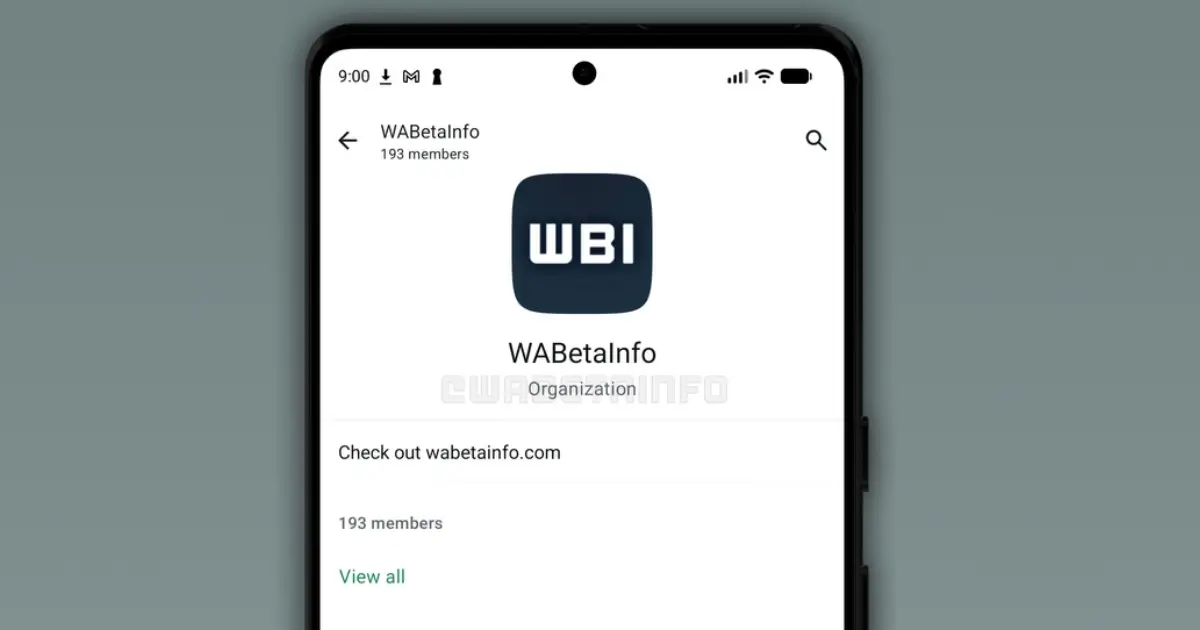
The feature showed up in WhatsApp beta for Android 2.26.43.1, the version distributed through the Google Play testing program. In the screenshot WABetaInfo published, the Organizations screen shows:
- the organization's name and a description
- the total number of members
- a "View all" button that opens the full member list
- for each member, the sub-groups they belong to
That last part is the interesting one. Today a community is basically a folder of groups plus an announcement group. Organizations would let an admin look at it the other way round: start from the person and see where they are.
WABetaInfo says the feature is "in very early stages of development" and "not available for testing," even for beta users. The report says nothing about iOS, the web app or desktop, and nothing about limits, eligibility or which admins get access. WhatsApp may change it a lot over the coming months, or not ship it at all.
It's for admins, not members
According to WABetaInfo, members won't see Organizations or interact with it. Their community looks and works exactly as before. It's a back-office view.
Communities launched in 2022; WABetaInfo first reported community creation in beta 2.22.19.3. WhatsApp pitched them at schools, workplaces and any organization that coordinates several groups, places with an obvious structure of classes or teams under one roof. Organizations looks like a tool for the people who run those structures once they get big.
Why organizers should care
Nothing in the beta mentions political or activist use. What follows is our own read of how it could fit.
A lot of organizing on WhatsApp looks like the structure we described in our six WhatsApp strategies for political campaigns: an announcement group on top, then regional groups, issue groups and volunteer groups underneath. It works, but the bigger it gets, the less anyone knows who's where. If Organizations ships roughly as the screenshot suggests, a few chores get easier.
The first is finding people who fell through the cracks. Someone joins the community, lands in the announcement group and never makes it into their local group. Right now you'd only notice if they complained. A member list with their groups next to it makes the gaps visible.
It also shows you your core. The people who are in five groups at once are usually the ones holding things together, and it's good to know who they are, both to lean on them and to check you're not burning them out.
Then there's the cleanup after a campaign. Once the election or the protest is over, the "Saturday logistics" group can go, and seeing who's still in which group makes it easier to close or merge groups without stranding anyone.
Handovers get easier too. Organizing groups rotate coordinators all the time. A new one could open a single screen and understand the community's shape instead of inheriting a pile of chats and a vague briefing.
The catch: one screen that maps everyone
A screen that lists every member and every group they belong to is handy for admins. It's also a ready-made map of your movement.
For a school parents' community, nobody cares. For a tenants' union, a migrant support network or a protest group, that map is sensitive. Whoever holds an admin's unlocked phone gets the whole picture: who's in the legal support group, who's in the direct action group, who's in both. Today that information is spread across dozens of chats. With Organizations it would sit on one screen.
The report doesn't say whether the list would show phone numbers, names as saved in contacts, or just profile names. It doesn't say whether every community admin would get access or only some. Those details will decide how risky this is, and we'll update this post when they're clearer.
We've written before about why number visibility matters for organizers. It's a big reason we suggest an empty community instead of a channel for one-way announcements, and why the Solidarity with Palestine bot went with a bot rather than a giant group. Organizations doesn't change what members can see of each other, but it does put everything admins can see in one place.
What to do now
There's nothing to switch on yet, so this is mostly prep.
- Check who your admins are. If Organizations gives every admin the full member map, the admin list matters more than it used to. Trim it to the people who need it.
- Tidy your group structure. Close dead groups and give the rest clear names. A member list grouped by "Barrio Norte", "Volunteers" and "Press" is useful. One grouped by "New group 4" isn't.
- Keep sensitive coordination out of the big community. If a group's membership is itself something you'd rather not have listed, that group probably shouldn't live inside the community at all.
- Know the limits you're working with. Communities have caps on groups and members. Our WhatsApp limits page has the current numbers.
If you're growing a community right now, a wa.me link or a QR code on your flyers still does most of the work. For one-way reach, compare Channels and broadcast lists before you pile everything into one community.
This comes a month after WABetaInfo spotted channels being tested in the Chats tab, and we're following both. There's more on running groups and campaigns in our organizing section.