Anyone who has run a WhatsApp Channel knows the quiet disappointment: you post an update and almost nobody reacts, because almost nobody saw it. That’s not your content’s fault, it’s structural. Channel posts land in the Updates tab, next to Statuses, and channel notifications are muted by default, so a follower only sees your post if they wander into that tab or went out of their way to turn notifications on. There is a way, as of 2026, to get channel-style broadcasting (admin-only posts, hidden member numbers) that lands in the Chats tab with normal notifications: a Community with zero groups. This guide explains the trick, why it works, its honest limits, and the exact setup.
Why channel posts go unseen
WhatsApp designed Channels to be deliberately low-noise: they support effectively unlimited followers, so the default is to protect those followers from notification overload. That trade-off makes sense for a news outlet with a million subscribers. It’s fatal for a small business, an NGO, a club, a school or a local campaign, situations where you need most members to actually see each message. With a channel, your reach depends on people remembering to open a tab they don’t otherwise use. (Channels still have their place, see WhatsApp Channels for organizations, but reach is their weak point.)
What changes if channels move to the Chats tab
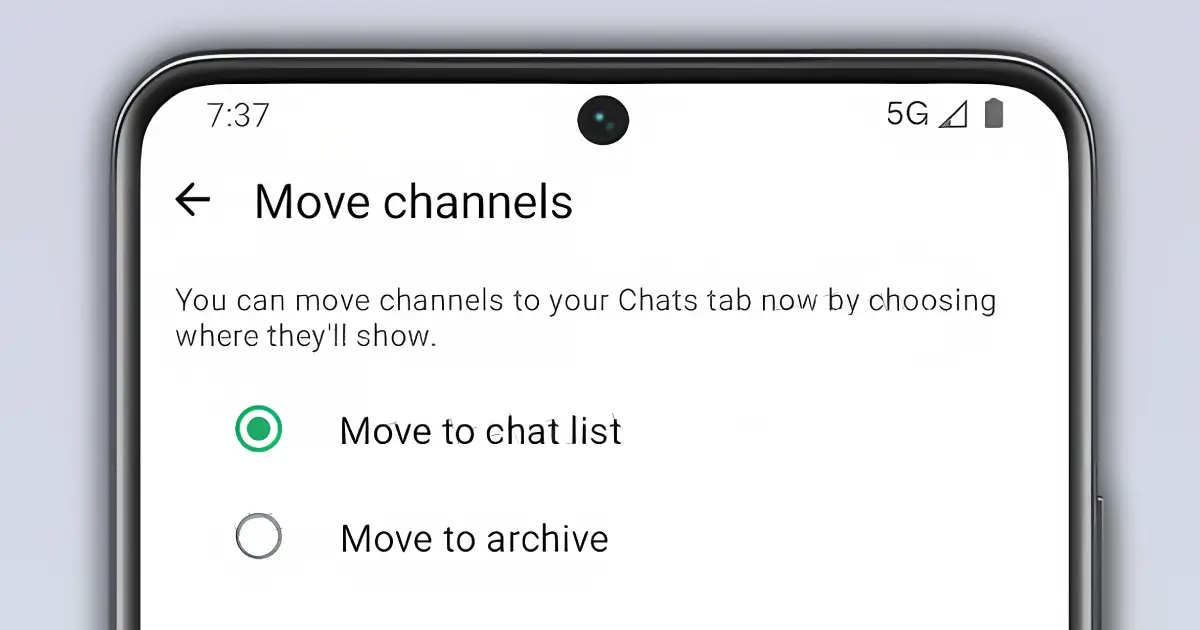
This part of the problem may get smaller. WhatsApp is testing channels in the Chats tab. In a beta for Android that WABetaInfo dug into, people who follow channels get a prompt asking whether to move them into their chat list or into the archive. For the chat list, WhatsApp is trying three layouts: channels mixed into the All list, channels hidden behind a "Channels" filter, or a single Channels folder. The Updates tab would then make way for a Contacts tab. It's still in development and has no release date.
Even in the best case, the hack keeps its edge. Nothing in the beta says channels stop being muted by default, and a community announcement already pings phones. The prompt also cuts the other way: a follower who taps "Move to archive" will see your channel less than they do today, while your community stays in their chats. So we'd still set one up for the people who need every message, and we'll update this guide once the feature reaches real users.
The hack: a Community with no groups
Communities were designed to bundle several groups under one umbrella, a school with one group per class, say. Every community automatically comes with an announcement group: every member of the community is in it, and only admins can write there. The hack is simply not to bundle anything. Create the community, add no groups at all, and share the community’s invite link. People who join get exactly one thing: your announcement feed.
Here’s why it beats a channel for reach: as far as the app is concerned, the announcement group is a chat. It sits in each member’s Chats tab, and an announcement arrives like any group message, with a push notification, on by default. A member can mute it like any chat, but the default works in your favour, which is the exact opposite of a channel. Same one-way broadcast, delivered where people actually look.
The privacy part (and why a big group won’t do)
The obvious alternative (one big normal group) fails on privacy: in a regular group, every member can see every other member’s phone number. That’s why people dread being added to large groups of strangers, and for an organization it’s a genuine data-protection problem. Announcement groups behave differently: the participant list is hidden from regular members (only admins can see it) and a member’s number stays invisible to people who don’t already have them saved as a contact.
To close the last gap, turn on phone number privacy in the announcement group’s settings (below Encryption in the group info). With it enabled, even reacting to an announcement won’t expose a member’s number, it stays visible only to community admins and to people who have that member in their contacts.
One warning to keep the promise intact: this shield covers the announcement group. If you add real groups to the community and members join them, numbers are visible inside those groups as usual. The “zero groups” part of this hack isn’t just tidiness, it is the privacy guarantee.
Step by step
- In WhatsApp, open the Communities tab and create a new community: name, description and icon. This is what people will see when they tap your invite link, so treat it like a storefront.
- When WhatsApp offers to create or add groups, skip it, add none. Recent versions auto-create a General chat; open its settings and restrict message sending to admins only (or remove it, if your version allows) so it stays silent and empty.
- Check the community settings: posting announcements is admin-only by default; add fellow admins if you need more hands.
- Open the announcement group’s info and enable phone number privacy, so even reactions don’t expose members’ numbers.
- Grab the community invite link from the community page and put it everywhere you’d put a channel link: website button, Instagram bio, email footer, a printed QR code.
- Post your updates in the announcement group, and keep the frequency respectful. Every message pings phones; that’s the whole point, and also the fastest way to get muted if you overdo it.
Empty community vs Channel, honestly
| Empty community (announcements) | Channel | |
|---|---|---|
| Where posts land | Chats tab, like a group message | Updates tab, next to Status (a move to Chats is being tested) |
| Notifications | On by default (each member can mute) | Muted by default (each follower must opt in) |
| Member phone numbers | Hidden from members; admins can see them | Hidden from other followers |
| Size limit | Up to 5,000 members | Effectively unlimited followers |
| Discovery | Invite link only | Searchable in-app directory |
| Encryption | End-to-end encrypted, like any group | Not end-to-end encrypted |
| Member feedback | Reactions and replies, replies are collapsed into threads and muted for everyone | Emoji reactions and polls only |
The honest limits
- The 5,000-member cap. An announcement group tops out around 5,000 members; a channel has no practical ceiling. Outgrow it and the upgrade path is a real channel or the official WhatsApp Business API.
- No discovery. Channels can be found in WhatsApp’s in-app directory; your community only grows through the invite link you distribute. You are the distribution.
- No history for newcomers. As in any group, people who join see only what’s posted after they arrive, re-share or pin your essentials periodically. A channel shows its recent post history to new followers.
- WhatsApp moves fast. The mechanics here, announcement groups, hidden participant lists, phone number privacy, have been stable for a while, but menu names and the General-chat behaviour shift between app versions. Check yours before you print 5,000 flyers.
- It’s still a broadcast, not automation. For scheduled or templated messages, segmented sends or chatbots, you’re in WhatsApp automation territory, a different tool for a different job.
Getting people in
The invite link is a plain URL, so everything you already do for a click-to-chat link applies: a button on your website, link-in-bio, email signatures, and a QR code on print. (Mind the QR print basics (size, contrast, quiet zone) covered in our troubleshooting guide.) A good combination is one of each: a wa.me link for people who want to talk to you, and the community link for people who want to hear from you. And if your audience is mostly existing contacts rather than strangers, compare this approach with broadcast lists before you commit.
Frequently asked questions
Will members see each other’s phone numbers?
No. In a community announcement group, the participant list is hidden from regular members (only admins can see it) and with phone number privacy enabled, even reacting to a post won’t expose a member’s number to strangers. Just keep the community free of regular groups, because inside those, numbers are visible as in any normal group.
Do announcements really trigger notifications?
Yes. The announcement group sits in each member’s Chats tab and behaves like a group chat, so an announcement arrives with a standard push notification unless that member has muted the chat. Replies from members are collapsed into threads and muted for everyone, so the feed stays quiet between your posts.
What happens when I outgrow 5,000 members?
The announcement group caps out around 5,000 members. Past that, either accept the Updates-tab trade-off and run a channel, or move to the official WhatsApp Business API, which handles opt-in broadcasts at scale, our automation guide compares the options.
Is the hack still worth it if channels move to the Chats tab?
Yes, for now. WhatsApp is testing channels in the Chats tab, but nothing in the beta says channel notifications stop being muted by default, and followers can also choose to send channels to the archive. A community announcement still lands in Chats with notifications on.